

Printing an IV Bag Label
Every IV bag needs a label that says whose it is and what is in it. The IV Therapy section prints one from the formulation you entered, so the label always matches the chart.
Printing the Label
- Fill in the IV Therapy Formulation table, including each substance’s Lot# and Exp., because they print on the label. See Building the IV Formulation.
- Under the table, click Print Bag Label. OutSmart saves the chart first, then opens the label in a new window.
- Choose the label size from the list at the top of the window.
- Type the bag’s expiry in the Expiry: box on the label.
- Click Print, and choose your label printer.
If the chart cannot be saved, the label does not open and a message says so; check your connection and click Print Bag Label again.
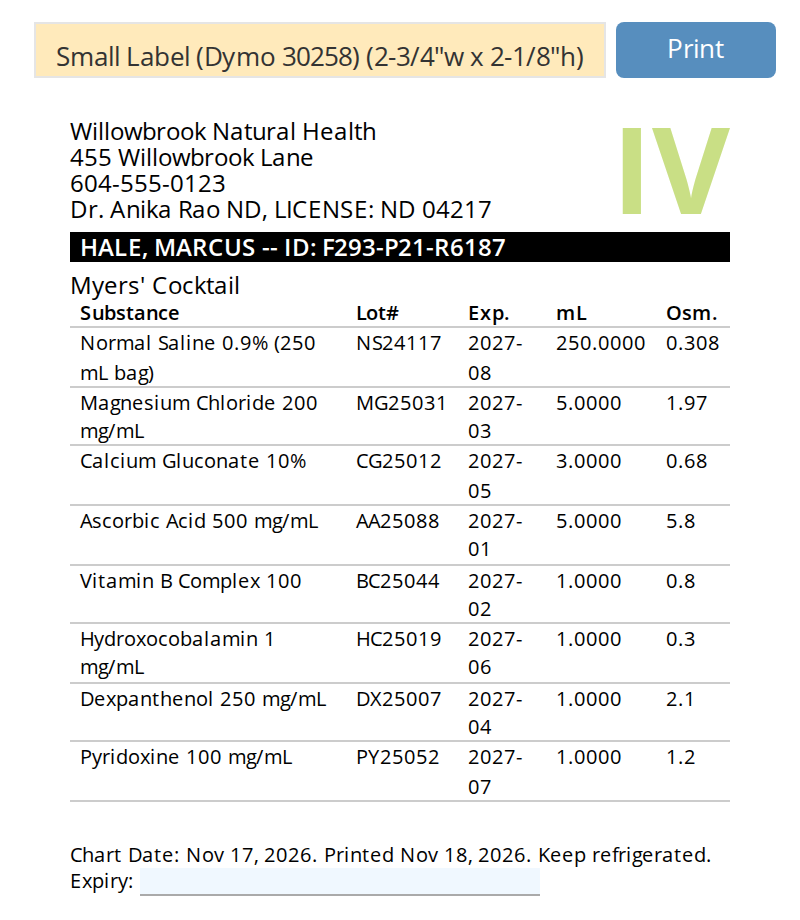
The bag label for a Myers' Cocktail, on a small Dymo label.
What Prints on the Label
- A large IV mark, so the bag is easy to tell apart from others.
- Your clinic’s name, address and phone number, and the practitioner’s name and licence.
- A black bar with the patient’s name, last name first, and an ID for this IV made from the chart (F), the patient (P) and the IV section (R).
- The IV’s name, from its heading.
- A table of the substances, with each one’s Lot#, Exp., volume in mL and osmolarity (Osm.).
- The chart’s date, the date printed, and Keep refrigerated.
- Expiry: with the date you typed.
The costs are not printed.
Label Sizes
| Size | Use it for |
|---|---|
| Small Label (Dymo 30258) (2-3/4”w x 2-1/8”h) | A Dymo label printer, with fewer than about ten substances. This is the size used until you choose another. |
| Large Label (4”w x 6”h) | A 4 by 6 label printer, or an IV with many substances. |
| Half Sheet (5-1/2”w x 8-1/2”h) | An ordinary office printer, printing on half a letter sheet. |
OutSmart remembers your choices. The size you choose and the text you type in Expiry: are saved for you, so the next label opens with the same size and the same expiry text. Change the expiry for each bag, because it is not worked out for you.
Printing Again
You can print the label as often as you need, before or after finalizing the IV. A finalized IV prints the lots that were recorded when it was produced.
Related Pages
- IV Therapy: adding the section and how it is laid out
- Building the IV Formulation: the lot numbers and amounts the label prints
- Finalizing the IV and Billing: producing the IV in the dispensary