

Finalizing the IV and Billing
Filling in the IV Therapy section records the IV, but it does not touch your dispensary: no stock moves and nothing can be billed. Finalize & Produce Blend is the step that does both. It produces the IV as a blend in the dispensary, takes each ingredient out of stock, and puts the IV on the patient’s row in Daily Express Checkout, ready for the invoice.
Finalize once the bag has been made and given. If the patient does not come, or you change the bag, nothing has to be undone.
Before You Finalize
The IV’s heading must be a recipe, because the blend is produced from it and takes its name and price. If the heading is empty or a protocol without a recipe, OutSmart shows Recipe Not Saved Or Selected. Save the formulation as a recipe first, or choose an existing one. See IV Protocols and Recipes.
The formulation needs at least two substances, each with an amount in CC (mL). Check the Lot# and Exp. of each row too, because the blend records them.
Finalizing
- Under the formulation table, click Finalize & Produce Blend. The Manufacture New Blend window opens.
- Check the details. The Name is the recipe’s name and cannot be changed here. Product Cost and Product Sale Price come from the recipe; the sale price is what goes on the invoice. Product SKU, Base Unit, Product Category and Tax Group can be set for this blend.
- Click Produce Blend & Update Inventory.
A Blend was produced, inventory was adjusted. message confirms it.
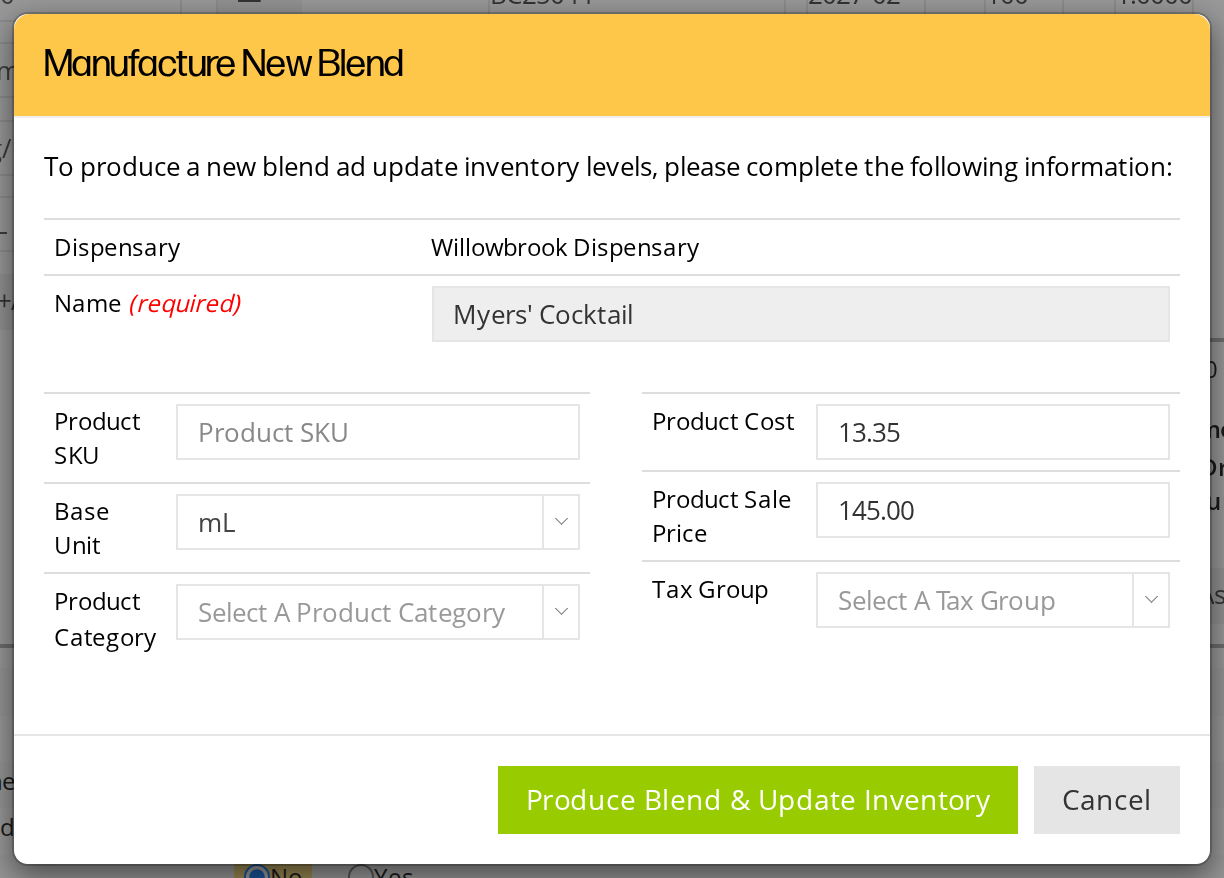
The blend takes its name and prices from the recipe.
What Finalizing Does
- It produces the IV as a product in the dispensary. The new product has the recipe’s name, its own lot number made from the date and time, and a description saying who produced it, for which patient, in which chart.
- It takes the ingredients out of stock. Each substance’s stock goes down by the amount in its CC (mL) column, in that product’s own unit.
- It records the lots used. The blend keeps each substance’s amount, lot number and expiry.
- It locks the formulation. The rows can no longer be changed. Reset Ingredients, Clear All, +Add Substance, Save As New Recipe, Update Recipe and Finalize & Produce Blend are hidden, and Cancel Blend appears beside Print Bag Label. The heading and the dispensary can no longer be changed either.
- It makes the IV billable. The IV appears in Daily Express Checkout for that visit.
The rest of the section, such as the vital signs and notes, can still be filled in after finalizing.
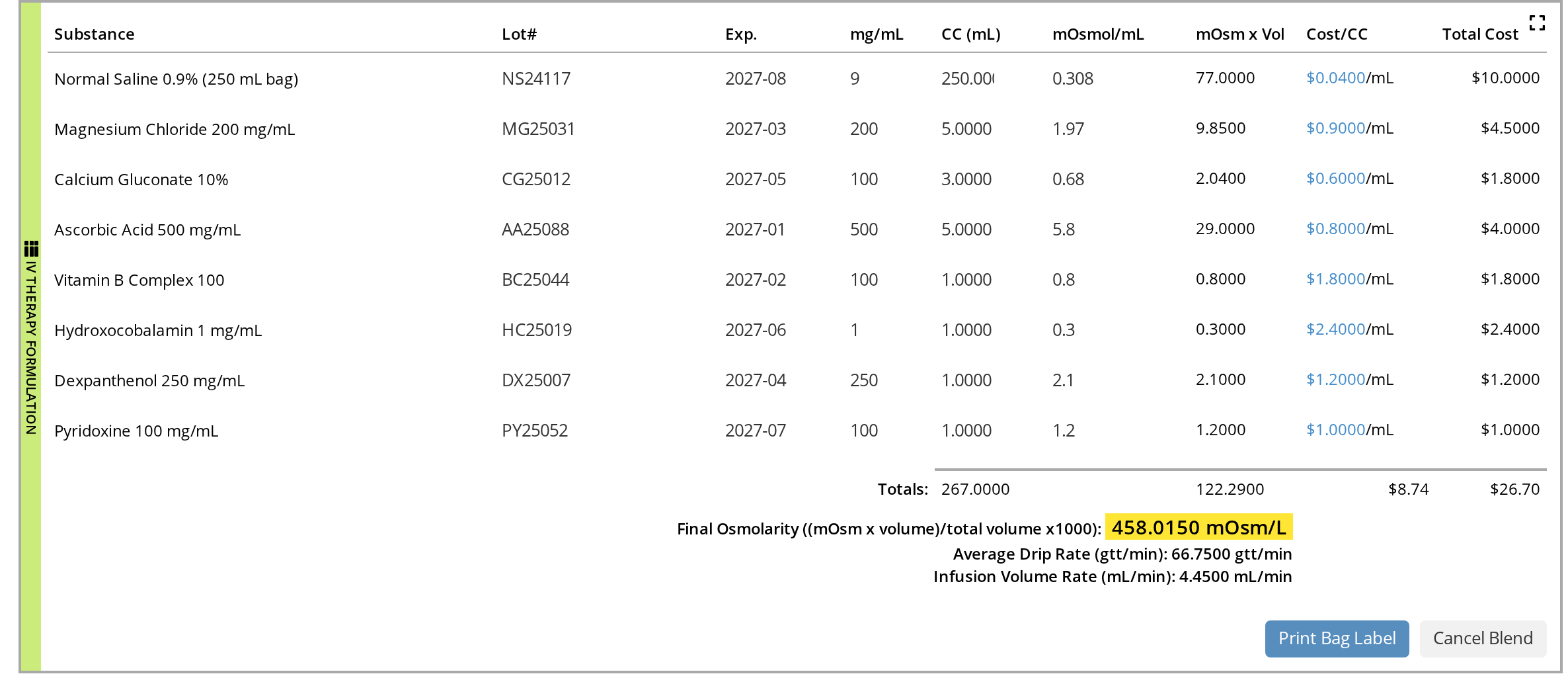
After finalizing, the formulation is locked and Cancel Blend appears.
Undoing a Finalized IV
If you finalized by mistake, or the IV was not given after all, click Cancel Blend, then Yes, undo the blend!.
OutSmart disables the blend product, which puts the ingredients back in stock, unlocks the formulation, and sets the heading back to the recipe. You can then change the IV and finalize it again.
Billing the IV in Daily Express Checkout
The finalized IV appears on the patient’s row in the Daily Express Checkout card on the dashboard, for the date of the visit.
- In Daily Express Checkout, open the patient’s row.
- Under SELECT ITEMS, find the item labelled IV THERAPY with the IV’s name, such as Myers’ Cocktail x 1. It shows who recommended it and lists the ingredients with their amounts and total volume.
- Click the item to select it for the invoice.
- Click New Invoice. The invoice opens with the IV on it, at the recipe’s sale price.
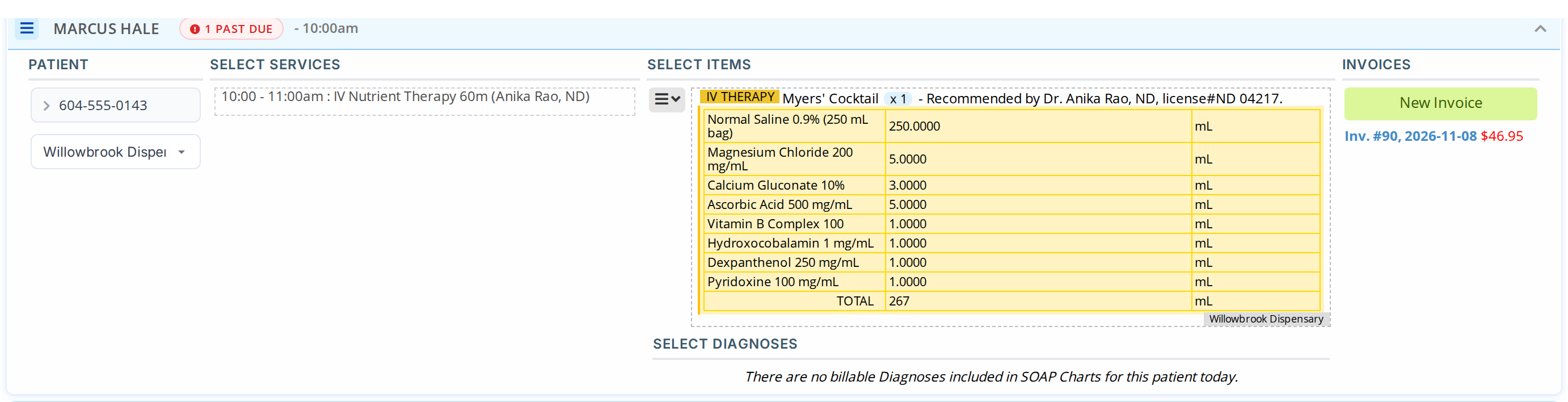
The finalized IV in Daily Express Checkout. Select it, then click New Invoice.
An IV that was not finalized also appears, marked (Recipe), with a note that it was added to the chart but not finalized. It cannot be selected: clicking it shows Cannot Add To Express Checkout List. Ask the practitioner to finalize it in the chart.
Express Checkout Options for IVs
The gear button on the Daily Express Checkout card holds two options for IVs:
- Whether the IV is billed as a Single Unit or by its Total Blend Volume.
- Do you want your IV Therapy ingredients to be auto-populated into the invoice? Choose to leave them out, or to add them to the item’s description, to the invoice memo, or to both.
When the practitioner who recommended the IV is not the one who gave it, the item’s description reads “Procedure recommended by” one practitioner “and performed by” the other, and the recommending practitioner is recorded on the invoice.
Related Pages
- IV Therapy: adding the section and how it is laid out
- IV Protocols and Recipes: the recipe a blend is produced from
- Recipes and Blends: blends across the dispensary
- Daily Express Checkout: billing a visit from the dashboard