

Building the IV Formulation
The IV Therapy Formulation is the table in the middle of the IV Therapy section. It lists what goes into the bag: one row for each substance, from the base fluid to each additive. As you fill it in, OutSmart adds up the total volume and cost and works out the bag’s final osmolarity and its drip rate.
The quickest way to fill the table is to choose a recipe or protocol in the heading, which adds all of its substances at once. See IV Protocols and Recipes. This article explains each part of the table, whether you start from a recipe or build the IV by hand.
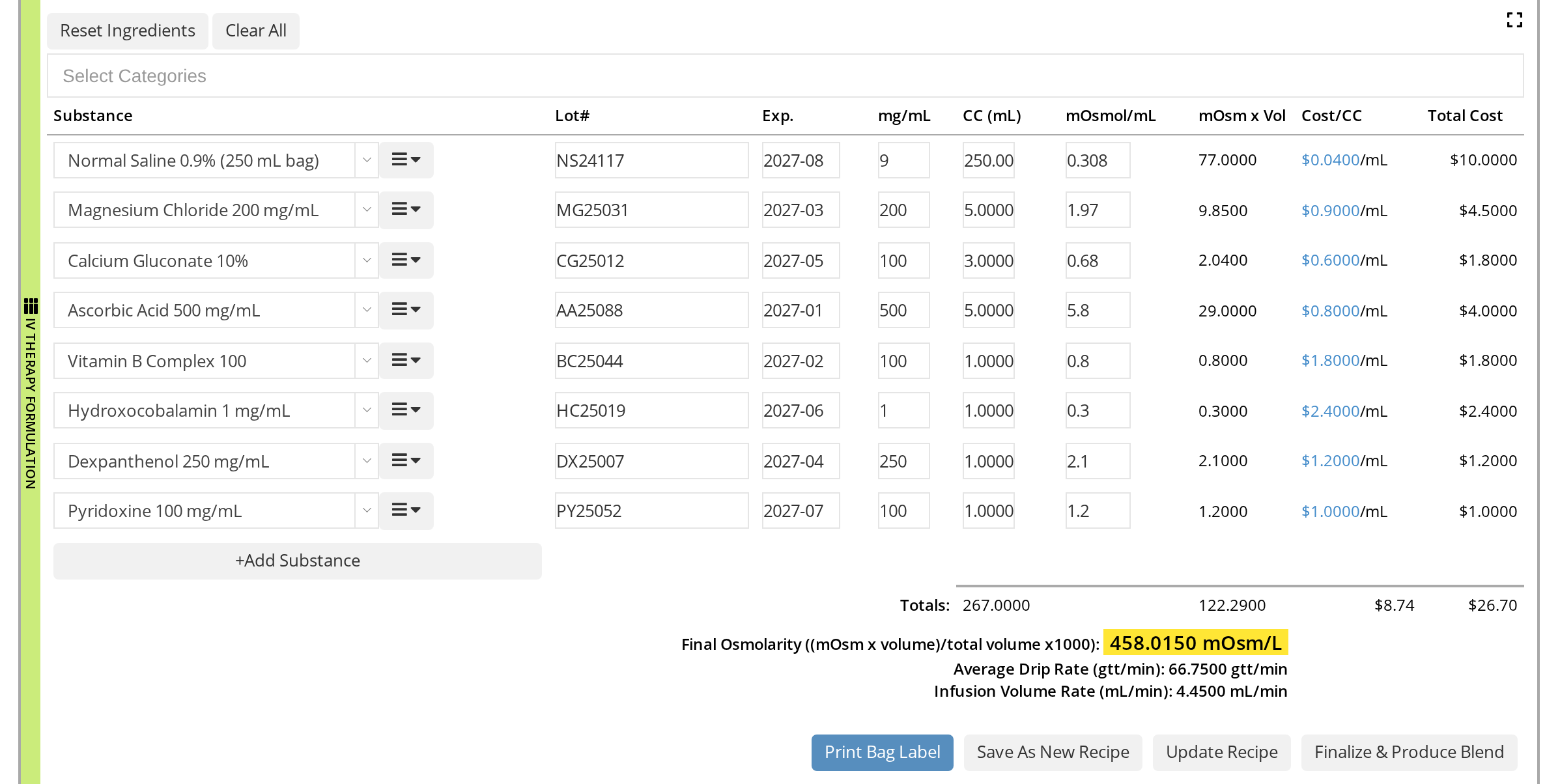
A Myers' Cocktail in a 250 mL saline bag. OutSmart works out everything under the table.
Choosing the Dispensary
The substances come from a dispensary. The box to the right of the heading shows which one: it starts with your default dispensary. To use another dispensary that you own or have been invited to, choose it there. The dispensary you choose becomes your default for the next IV.
The Columns
| Column | What it is |
|---|---|
| Substance | The product from your dispensary. Each choice shows how much is in stock. |
| Lot# | The lot number on the vial or bag you are using. |
| Exp. | The expiry date on the vial or bag. |
| mg/mL | The substance’s concentration. |
| CC (mL) | How much of it goes into the bag, in mL. |
| mOsmol/mL | The substance’s osmolarity per mL. |
| mOsm x Vol | Worked out for you: mOsmol/mL times CC. |
| Cost/CC | The product’s cost per mL, from the dispensary. |
| Total Cost | Worked out for you: the cost of the amount used. |
Lot#, Exp., mg/mL and mOsmol/mL carry forward. When you save the chart, OutSmart remembers these four values for each product. The next time anyone at the clinic adds that product to an IV, they are filled in already, so you only change them when you open a new lot.
Adding a Substance
- Click +Add Substance, under the last row. A new row appears.
- Click the Substance box and type at least two letters of the product’s name. Choose it from the list.
- Fill in Lot#, Exp., mg/mL, CC (mL) and mOsmol/mL, or check the values that were filled in for you.
The substance list offers single products, not blends. To narrow it to some kinds of product, choose one or more categories in Select Categories above the table first.
The menu button at the right of each substance box has two items:
- Create New Ingredient opens a window to add a product to the dispensary that is not there yet.
- Remove Row takes the row out of the table.
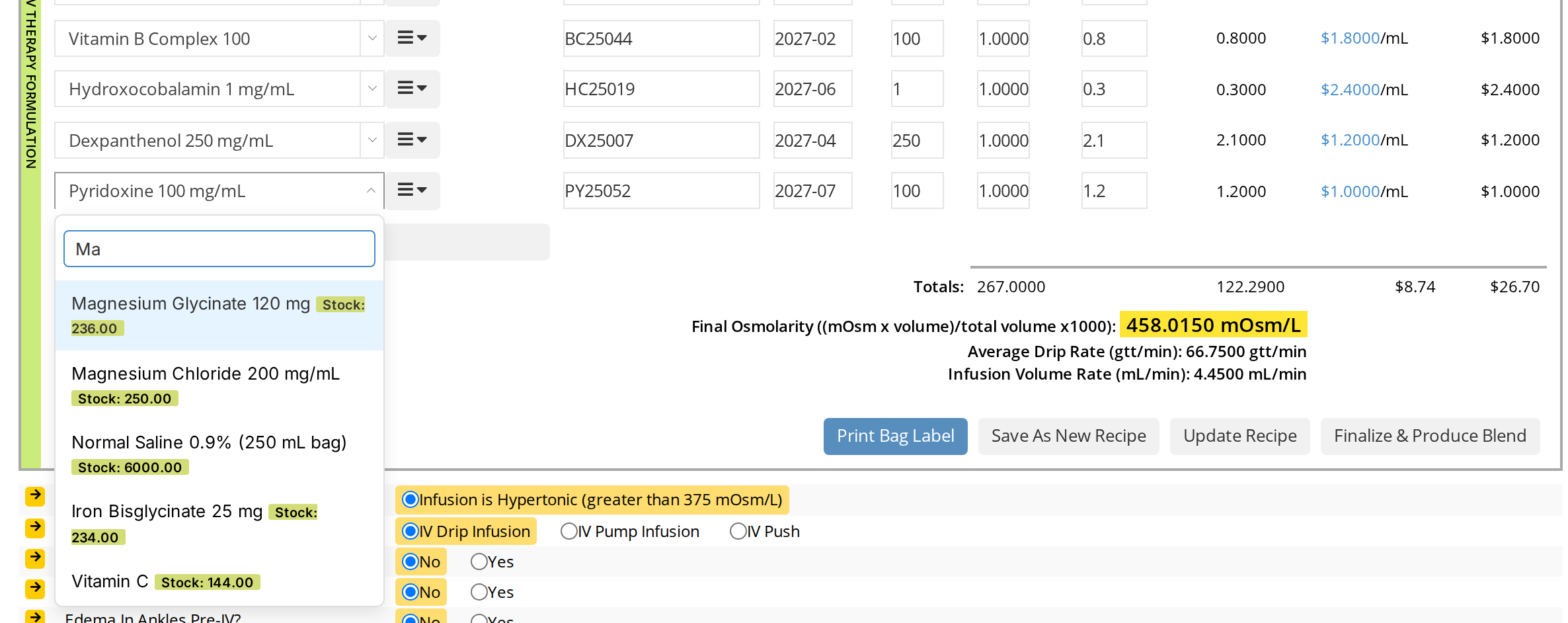
Type two letters to search the dispensary's products.
Reset Ingredients and Clear All
The two buttons above the table change all of the rows at once.
- Reset Ingredients puts the rows back to the recipe chosen in the heading, with the recipe’s substances and amounts. Use it when you have changed the bag for this patient and want to start again from the recipe.
- Clear All removes every row.
The Totals and Calculations
Under the table, OutSmart works out:
- Totals: the bag’s total volume (the CC column), the total of mOsm x Vol, and the Total Cost.
- Final Osmolarity ((mOsm x volume)/total volume x1000): the total mOsm divided by the total volume, in mOsm/L. It is highlighted in yellow.
- Average Drip Rate (gtt/min): the drops per minute needed to give the bag in the time set.
- Infusion Volume Rate (mL/min): the mL per minute needed to give the bag in the time set.
The totals change as soon as you change a row. A row with no mOsmol/mL value counts as zero, which makes the final osmolarity look lower than it is, so check that every row has one.
How OutSmart Works Out the Drip Rate
The two rates use the Duration and mL->gtt boxes at the top of the section. See Pre-IV Screening and Infusion Timing.
- Infusion Volume Rate = total volume ÷ duration in minutes.
- Average Drip Rate = total volume ÷ duration in minutes × drops per mL.
For example, a 267 mL bag over 60 minutes with a 15 drops per mL set runs at 4.45 mL a minute, or 66.75 drops a minute.
What Has to Be There Before Saving a Recipe or Finalizing
To save the formulation as a recipe, update a recipe, or finalize the IV, the table needs at least two rows, each with a substance and a CC (mL) above zero. If it does not, an Incomplete Ingredients List message explains what is missing.
The Buttons Under the Formulation
- Print Bag Label prints the label for the bag. See Printing an IV Bag Label.
- Save As New Recipe and Update Recipe save the substances and amounts as a recipe. See IV Protocols and Recipes.
- Finalize & Produce Blend produces the IV as a blend in the dispensary and makes it billable. See Finalizing the IV and Billing.
Related Pages
- IV Therapy: adding the section and how it is laid out
- IV Protocols and Recipes: filling the table from a saved recipe or protocol
- Finalizing the IV and Billing: what happens to the ingredients’ stock