

Pre-IV Screening and Infusion Timing
Before the bag goes up, the top of the IV Therapy section records the checks you make with the patient and the timing of the infusion. Everything here is on the left and right under the heading row, above the IV Therapy Formulation table.
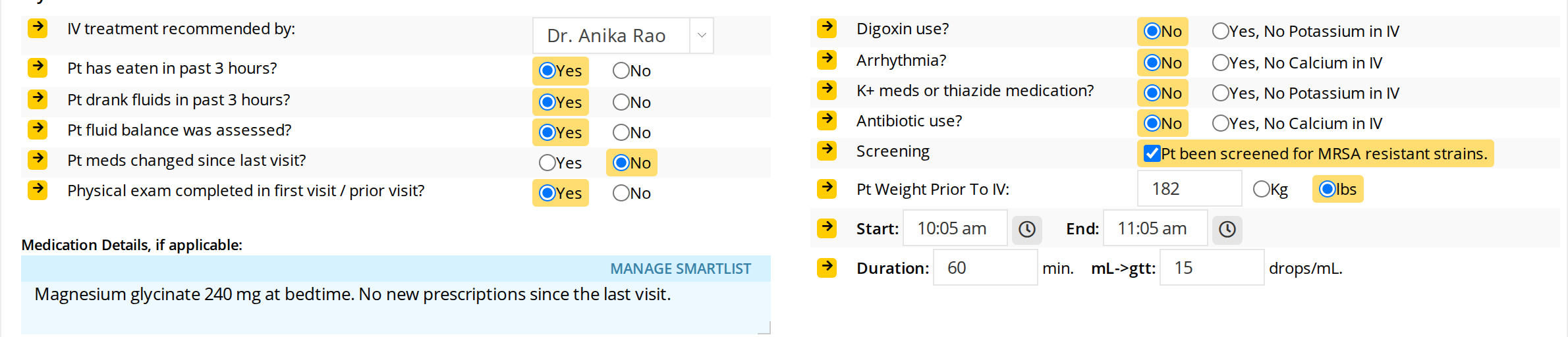
The screening questions on the left and right, with the patient's weight and the infusion timing at the bottom right.
Who Recommended the IV
IV treatment recommended by shows the practitioner who recommended this IV. It starts with the practitioner whose chart this is. Choose another practitioner from the list when a colleague recommended the IV and you are the one giving it.
When the two are different, the IV’s description in Daily Express Checkout reads “Procedure recommended by” the recommending practitioner “and performed by” you, and the recommending practitioner is recorded on the invoice. See Finalizing the IV and Billing.
The Screening Questions
Each question has two choices. Click the one that applies.
On the left:
- Pt has eaten in past 3 hours? Yes or No.
- Pt drank fluids in past 3 hours? Yes or No.
- Pt fluid balance was assessed? Yes or No.
- Pt meds changed since last visit? Yes or No.
- Physical exam completed in first visit / prior visit? Yes or No.
On the right, each Yes answer is also a reminder of what to leave out of the bag:
- Digoxin use? No, or Yes, No Potassium in IV.
- Arrhythmia? No, or Yes, No Calcium in IV.
- K+ meds or thiazide medication? No, or Yes, No Potassium in IV.
- Antibiotic use? No, or Yes, No Calcium in IV.
- Screening: check Pt been screened for MRSA resistant strains. once the patient has been screened.
The answer you choose is highlighted, so you can see at a glance which questions are still unanswered.
Medication Details
Medication Details, if applicable: is a box for the patient’s current medications and anything else about them that matters for this IV. Type in it as you would in any chart box. MANAGE SMARTLIST at its top right opens your SmartList, so you can insert wording you use often.
The Patient’s Weight
Pt Weight Prior To IV: records the patient’s weight before the infusion. Type the number, then choose Kg or lbs. lbs is chosen until you change it.
Start, End, Duration and Drops per mL
The four timing boxes are under the weight, on the right.
- Start: is the time the infusion started. It is filled in with the time you added the section. Click the box to choose another time, or click the clock button beside it to set it to the time right now.
- End: is the time the infusion ended. Click the clock button beside it when the infusion stops to set it to the time right now.
- Duration: is the length of the infusion in minutes.
- mL->gtt: is the drop factor of the administration set, in drops per mL, as printed on the set’s packaging (for example 10, 15, 20 or 60).
Start, End and Duration fill each other in.
- Type a Duration, and OutSmart works out the End time from the Start time.
- Change the Start or the End, and OutSmart works out the Duration.
So at the start of an IV you can enter the start time and how long the infusion should take, and the end time is ready to compare against the clock. If the infusion runs longer or shorter, set the End time when it stops and the duration corrects itself.

A 60 minute infusion from 10:05 am, with a drop factor of 15 drops per mL.
The duration and the drops per mL are what OutSmart uses for the Average Drip Rate and the Infusion Volume Rate under the formulation. See Building the IV Formulation.
What a Protocol Keeps
When you save the section as a protocol, the recommending practitioner, the medication details, the duration and the drops per mL are saved with it. The screening answers, the weight and the start and end times are not, because they belong to each visit. See IV Protocols and Recipes.
Related Pages
- IV Therapy: adding the section and how it is laid out
- Building the IV Formulation: the substances in the bag
- Documenting the Infusion: the access device, the vital signs and the outcome